카페 온라인 주문 매출 시각화 - vue-chartjs, chart.js
Vue Chart
매출 분석은 차트로 시각화 하여 나타내도록 합시다.
차트를 사용하여 매출을 시각화합니다.
Vue.js 애플리케이션에서 차트를 시각화하기 위해 필요한 두 가지 라이브러리입니다.
🔹 chart.js@4
- Chart.js는 HTML5 <cnavas>를 이용한 오픈소스 차트 라이브러리입니다.
- @4는 버전 4를 명시한 것으로, 최신 메이저 버전인 Chart.js 4를 설치합니다.
- 다양한 차트 유형(선형, 막대형, 원형 등)을 쉽게 구현할 수 있도록 도와줍니다.
🔹 vue-chartjs@5
- vue-chartjs는 Vue.js에서 Chart.js를 손쉽게 사용할 수 있도록 래핑(wrapping)한 라이브러리입니다.
- @5는 vue-chartjs의 버전 5로, Vue 3와 Chart.js 4에 최적화되어 있습니다.
- Composition API와 함께 사용하기 편하게 설계되어 있어 Vue 3 프로젝트에 적합합니다.
🔧 Vue Chart 설치
npm install chart.js@4 vue-chartjs@5
이 명령은 다음을 설치합니다:
- chart.js 라이브러리의 4.x 버전
- vue-chartjs 라이브러리의 5.x 버전 (Vue 3용)
이 조합은 Vue 3 프로젝트에서 차트를 표시하려는 경우 가장 호환성 있는 버전 조합입니다.
차트 컴포넌트 예제
ChatGPT의 말:
다음은 Vue 3 + Composition API + vue-chartjs@5 + chart.js@4를 사용하는 간단한 막대 차트 컴포넌트 예제입니다:
📁 BarChart.vue - 차트 컴포넌트
<template>
  <Bar :data="chartData" :options="chartOptions" />
</template>

<script setup>
import {
  Chart as ChartJS,
  Title,
  Tooltip,
  Legend,
  BarElement,
  CategoryScale,
  LinearScale,
} from 'chart.js'
import { Bar } from 'vue-chartjs'

// Chart.js에 필요한 컴포넌트 등록
ChartJS.register(Title, Tooltip, Legend, BarElement, CategoryScale, LinearScale)

// 차트 데이터
const chartData = {
  labels: ['January', 'February', 'March', 'April'],
  datasets: [
    {
      label: 'Sales',
      backgroundColor: '#42A5F5',
      data: [40, 20, 12, 39],
    },
  ],
}

// 차트 옵션
const chartOptions = {
  responsive: true,
  plugins: {
    legend: {
      position: 'top',
    },
    title: {
      display: true,
      text: 'Monthly Sales',
    },
  },
}
</script>
✅ 사용 방법
위 컴포넌트를 페이지에서 사용하려면:
<template>
  <BarChart />
</template>

<script setup>
import BarChart from './components/BarChart.vue'
</script>
매출 대시보드
- 매출 대시보드를 통해 매출 데이터를 시각적으로 통합하여 실시간으로 모니터링합니다.
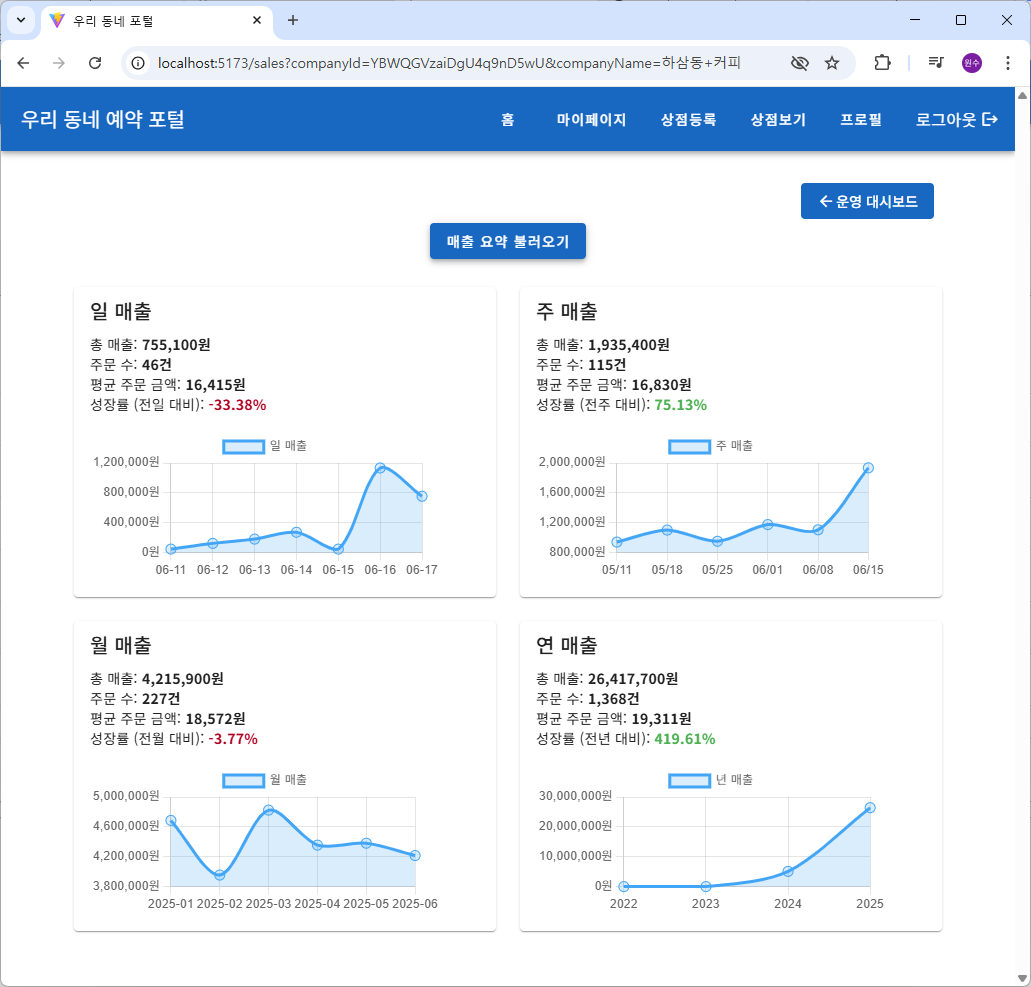
useSalesSummary.js
useSalesSummary는 Vue 3의 Composition API와 Firebase Firestore를 활용해
매출 요약 및 트렌드 데이터(일/주/월/연/시간대별)를 계산하고 시각화하기 위한 Composable 함수입니다.
import { ref } from 'vue'
import { collection, query, where, orderBy, getDocs, Timestamp } from 'firebase/firestore'
import { db } from '@/firebase'
import {
  startOfDay, endOfDay, subDays,
  startOfWeek, endOfWeek, subWeeks,
  startOfMonth, endOfMonth, subMonths,
  startOfYear, endOfYear, subYears,
  format
} from 'date-fns'

export function useSalesSummary(companyId) {
  const salesSummary = ref({
    day: { total: 0, count: 0, avg: 0, growth: null },
    week: { total: 0, count: 0, avg: 0, growth: null },
    month: { total: 0, count: 0, avg: 0, growth: null },
    year: { total: 0, count: 0, avg: 0, growth: null },
  })

  const dayLabels = ref([])
  const daySales = ref([])
  const weekLabels = ref([])
  const weekSales = ref([])
  const monthLabels = ref([])
  const monthSales = ref([])
  const yearLabels = ref([])
  const yearSales = ref([])

  const getOrdersInPeriod = async (startDate, endDate) => {
    const ordersRef = collection(db, 'companies', companyId, 'orders')
    const q = query(
      ordersRef,
      where('createdAt', '>=', Timestamp.fromDate(startDate)),
      where('createdAt', '<=', Timestamp.fromDate(endDate))
    )
    const snapshot = await getDocs(q)
    return snapshot.docs.map(doc => doc.data())
  }

  const calcSummary = (orders) => {
    const count = orders.length
    const total = orders.reduce((acc, o) => acc + (o.totalAmount || 0), 0)
    const avg = count > 0 ? total / count : 0
    return { total, count, avg }
  }

  const calcGrowth = (current, previous) => {
    if (previous === 0) return null
    return ((current - previous) / previous) * 100
  }

  const loadSummary = async (baseDateStr = null) => {
    const now = baseDateStr ? new Date(baseDateStr) : new Date()

    const [todayStart, todayEnd] = [startOfDay(now), endOfDay(now)]
    const [yesterdayStart, yesterdayEnd] = [startOfDay(subDays(now, 1)), endOfDay(subDays(now, 1))]

    const [thisWeekStart, thisWeekEnd] = [startOfWeek(now), endOfWeek(now)]
    const [lastWeekStart, lastWeekEnd] = [startOfWeek(subWeeks(now, 1)), endOfWeek(subWeeks(now, 1))]

    const [thisMonthStart, thisMonthEnd] = [startOfMonth(now), endOfMonth(now)]
    const [lastMonthStart, lastMonthEnd] = [startOfMonth(subMonths(now, 1)), endOfMonth(subMonths(now, 1))]

    const [thisYearStart, thisYearEnd] = [startOfYear(now), endOfYear(now)]
    const [lastYearStart, lastYearEnd] = [startOfYear(subYears(now, 1)), endOfYear(subYears(now, 1))]

    const [
      todayOrders, yesterdayOrders,
      thisWeekOrders, lastWeekOrders,
      thisMonthOrders, lastMonthOrders,
      thisYearOrders, lastYearOrders
    ] = await Promise.all([
      getOrdersInPeriod(todayStart, todayEnd),
      getOrdersInPeriod(yesterdayStart, yesterdayEnd),
      getOrdersInPeriod(thisWeekStart, thisWeekEnd),
      getOrdersInPeriod(lastWeekStart, lastWeekEnd),
      getOrdersInPeriod(thisMonthStart, thisMonthEnd),
      getOrdersInPeriod(lastMonthStart, lastMonthEnd),
      getOrdersInPeriod(thisYearStart, thisYearEnd),
      getOrdersInPeriod(lastYearStart, lastYearEnd),
    ])

    salesSummary.value.day = {
      ...calcSummary(todayOrders),
      growth: calcGrowth(
        calcSummary(todayOrders).total,
        calcSummary(yesterdayOrders).total
      )
    }

    salesSummary.value.week = {
      ...calcSummary(thisWeekOrders),
      growth: calcGrowth(
        calcSummary(thisWeekOrders).total,
        calcSummary(lastWeekOrders).total
      )
    }

    salesSummary.value.month = {
      ...calcSummary(thisMonthOrders),
      growth: calcGrowth(
        calcSummary(thisMonthOrders).total,
        calcSummary(lastMonthOrders).total
      )
    }

    salesSummary.value.year = {
      ...calcSummary(thisYearOrders),
      growth: calcGrowth(
        calcSummary(thisYearOrders).total,
        calcSummary(lastYearOrders).total
      )
    }

    await Promise.all([
      loadDailyTrend(baseDateStr),
      loadWeeklyTrend(baseDateStr),
      loadMonthlyTrend(baseDateStr),
      loadYearlyTrend(baseDateStr)
    ])
  }

  const loadDailyTrend = async (baseDateStr) => {
    const today = new Date(baseDateStr)
    const startDate = subDays(today, 6)

    const dates = Array.from({ length: 7 }).map((_, i) => {
      const date = subDays(today, 6 - i)
      return format(date, 'yyyy-MM-dd')
    })

    const ordersRef = collection(db, 'companies', companyId, 'orders')
    const q = query(
      ordersRef,
      where('createdAt', '>=', Timestamp.fromDate(startDate)),
      orderBy('createdAt')
    )

    const snapshot = await getDocs(q)

    const salesMap = {}
    snapshot.forEach(doc => {
      const data = doc.data()
      const dateKey = format(data.createdAt.toDate(), 'yyyy-MM-dd')
      salesMap[dateKey] = (salesMap[dateKey] || 0) + (data.totalAmount || 0)
    })

    const trend = dates.map(dateStr => ({
      date: format(new Date(dateStr), 'MM-dd'),
      total: salesMap[dateStr] || 0,
    }))

    dayLabels.value = trend.map(item => item.date)
    daySales.value = trend.map(item => item.total)
  }

  //const loadWeeklyTrend = async () => {
    //const today = new Date()
  const loadWeeklyTrend = async (baseDateStr) => {
    const today = new Date(baseDateStr)
    const weeks = Array.from({ length: 6 }).map((_, i) => {
      const start = startOfWeek(subWeeks(today, 5 - i))
      const end = endOfWeek(start)
      return { label: format(start, 'MM/dd'), start, end }
    })

    const ordersRef = collection(db, 'companies', companyId, 'orders')
    const startDate = weeks[0].start

    const q = query(
      ordersRef,
      where('createdAt', '>=', Timestamp.fromDate(startDate)),
      orderBy('createdAt')
    )
    const snapshot = await getDocs(q)

    const salesMap = new Map()

    snapshot.forEach(doc => {
      const data = doc.data()
      const created = data.createdAt.toDate()
      for (const week of weeks) {
        if (created >= week.start && created <= week.end) {
          salesMap.set(week.label, (salesMap.get(week.label) || 0) + (data.totalAmount || 0))
          break
        }
      }
    })

    weekLabels.value = weeks.map(w => w.label)
    weekSales.value = weeks.map(w => salesMap.get(w.label) || 0)
  }

  const loadMonthlyTrend = async (baseDateStr) => {
    //const today = new Date()
    const today = new Date(baseDateStr)
    const months = Array.from({ length: 6 }).map((_, i) => {
      const date = subMonths(today, 5 - i)
      return {
        label: format(date, 'yyyy-MM'),
        start: startOfMonth(date),
        end: endOfMonth(date),
      }
    })

    const ordersRef = collection(db, 'companies', companyId, 'orders')
    const startDate = months[0].start

    const q = query(
      ordersRef,
      where('createdAt', '>=', Timestamp.fromDate(startDate)),
      orderBy('createdAt')
    )
    const snapshot = await getDocs(q)

    const salesMap = new Map()

    snapshot.forEach(doc => {
      const data = doc.data()
      const created = data.createdAt.toDate()
      for (const month of months) {
        if (created >= month.start && created <= month.end) {
          salesMap.set(month.label, (salesMap.get(month.label) || 0) + (data.totalAmount || 0))
          break
        }
      }
    })

    monthLabels.value = months.map(m => m.label)
    monthSales.value = months.map(m => salesMap.get(m.label) || 0)
  }

  const loadYearlyTrend = async (baseDateStr) => {
    //const today = new Date()
    const today = new Date(baseDateStr)
    const years = Array.from({ length: 4 }).map((_, i) => {
      const date = subYears(today, 3 - i)
      return {
        label: format(date, 'yyyy'),
        start: startOfYear(date),
        end: endOfYear(date),
      }
    })

    const ordersRef = collection(db, 'companies', companyId, 'orders')
    const startDate = years[0].start

    const q = query(
      ordersRef,
      where('createdAt', '>=', Timestamp.fromDate(startDate)),
      orderBy('createdAt')
    )
    const snapshot = await getDocs(q)

    const salesMap = new Map()

    snapshot.forEach(doc => {
      const data = doc.data()
      const created = data.createdAt.toDate()
      for (const year of years) {
        if (created >= year.start && created <= year.end) {
          salesMap.set(year.label, (salesMap.get(year.label) || 0) + (data.totalAmount || 0))
          break
        }
      }
    })

    yearLabels.value = years.map(y => y.label)
    yearSales.value = years.map(y => salesMap.get(y.label) || 0)
  }

  // 시간대별 매출
  const hourlyLabels = ref([])
  const hourlyTotalAmounts = ref([])
  const hourlyOrderCounts = ref([])

  const loadHourlySales = async (companyId, startDate, endDate) => {
    const ordersRef = collection(db, "companies", companyId, "orders")
    const q = query(
      ordersRef,
      where("createdAt", ">=", Timestamp.fromDate(startDate)),
      where("createdAt", "<=", Timestamp.fromDate(endDate))
    )
    const snapshot = await getDocs(q)

    const hourlyData = new Array(24).fill(0)
    const hourlyCounts = new Array(24).fill(0)

    snapshot.forEach(doc => {
      const order = doc.data()
      const hour = order.createdAt.toDate().getHours()
      hourlyData[hour] += order.totalAmount || 0
      hourlyCounts[hour] += 1
    })

    hourlyLabels.value = Array.from({ length: 24 }, (_, i) => `${i}시`)
    hourlyTotalAmounts.value = hourlyData
    hourlyOrderCounts.value = hourlyCounts
  }

  /**
   * 메뉴별 판매 통계에 카테고리 포함
   * items 배열 내 객체: { name, category, quantity, price }
   */
  const loadProductSalesByMenu = async (companyId, startDate, endDate) => {
    const ordersRef = collection(db, 'companies', companyId, 'orders')
    const q = query(
      ordersRef,
      where('createdAt', '>=', Timestamp.fromDate(startDate)),
      where('createdAt', '<=', Timestamp.fromDate(endDate))
    )

    const snapshot = await getDocs(q)
    const salesMap = new Map()

    snapshot.forEach((doc) => {
      const order = doc.data()
      const items = order.items || []

      items.forEach(({ name, categoryName, quantity, price }) => {
        const key = `${name}|${categoryName || '기타'}`
        const prev = salesMap.get(key) || { quantity: 0, total: 0 }

        salesMap.set(key, {
          quantity: prev.quantity + quantity,
          total: prev.total + quantity * price,
        })
      })
    })

    return Array.from(salesMap.entries()).map(([key, data]) => {
      const [productName, category] = key.split('|')
      return {
        productName,
        category,
        quantitySold: data.quantity,
        totalAmount: data.total,
      }
    })
  }

  return {
    salesSummary,
    dayLabels,
    daySales,
    weekLabels,
    weekSales,
    monthLabels,
    monthSales,
    yearLabels,
    yearSales,
    hourlyLabels,
    hourlyTotalAmounts,
    hourlyOrderCounts,
    loadSummary,
    loadHourlySales,
    loadProductSalesByMenu,
  }
}
아래는 전체 구조와 각 기능의 상세 설명입니다.
✅ 개요
useSalesSummary(companyId)는 특정 회사(companyId)의 주문 데이터(orders)를 바탕으로 다음을 제공합니다:
- 요약 통계 (매출 총합, 주문 수, 평균 주문 금액, 전일/전주/전월 대비 성장률)
- 일/주/월/년 단위 매출 트렌드
- 시간대별 매출 분석
- 메뉴별 판매 통계 (카테고리 포함)
📊 반환하는 데이터 구조
- salesSummary
salesSummary = {
  day:   { total, count, avg, growth },
  week:  { total, count, avg, growth },
  month: { total, count, avg, growth },
  year:  { total, count, avg, growth }
}- total: 총 매출
- count: 주문 수
- avg: 평균 주문 금액
- growth: 전 기간 대비 성장률 (null: 이전 값이 0일 경우)
📈 트렌드 관련 ref
- dayLabels, daySales: 최근 7일 간 일별 매출
- weekLabels, weekSales: 최근 6주 간 주별 매출
- monthLabels, monthSales: 최근 6개월 간 월별 매출
- yearLabels, yearSales: 최근 4년 간 연도별 매출
- hourlyLabels, hourlyTotalAmounts, hourlyOrderCounts: 시간대별 매출/주문 수
⚙️ 주요 함수 설명
getOrdersInPeriod(startDate, endDate)
- 특정 기간 내 주문을 Firestore에서 조회합니다.
calcSummary(orders)
- orders 배열을 기반으로 총 매출, 주문 수, 평균 금액을 계산합니다.
calcGrowth(current, previous)
- 전 기간 대비 매출 증가율(%)을 계산합니다.
loadSummary()
- 오늘, 이번주, 이번달, 올해와 그 이전 기간의 데이터를 가져와 요약 통계를 계산하고 salesSummary에 저장합니다.
- 이 함수는 모든 트렌드 데이터도 함께 로드합니다.
loadDailyTrend()
- 최근 7일간의 일별 매출 트렌드를 계산하여 dayLabels, daySales에 저장합니다.
loadWeeklyTrend()
- 최근 6주 간의 주간 매출 트렌드 계산
loadMonthlyTrend()
- 최근 6개월 간의 월별 매출 트렌드 계산
loadYearlyTrend()
- 최근 4년 간의 연도별 매출 트렌드 계산
✅ 요약
이 useSalesSummary() composable은 매출 분석을 위한 강력한 도구입니다. Firestore 데이터를 기반으로 다양한 기간별 매출 트렌드와 요약을 계산하여, 관리자 대시보드나 통계 차트 등에 바로 사용할 수 있습니다.
1. getOrdersInPeriod
이 함수는 Firebase Firestore에서 특정 기간(startDate ~ endDate) 동안의 주문 데이터를 가져오는 역할을 합니다.
🔧 함수 설명
const getOrdersInPeriod = async (startDate, endDate) => {- startDate, endDate: JavaScript Date 객체로 전달되며, 검색할 시간 범위를 의미합니다.
📦 1. Firestore 경로 설정
const ordersRef = collection(db, 'companies', companyId, 'orders')- Firestore에서 companies/{companyId}/orders 경로의 하위 컬렉션을 참조합니다.
- 즉, 특정 회사(companyId)의 주문 목록을 대상으로 조회합니다.
🔍 2. 조건 쿼리 생성
const q = query(
  ordersRef,
  where('createdAt', '>=', Timestamp.fromDate(startDate)),
  where('createdAt', '<=', Timestamp.fromDate(endDate))
)- createdAt 필드가 startDate와 endDate 사이에 있는 문서만 조회합니다.
- Timestamp.fromDate(...)는 Date 객체를 Firestore에서 사용하는 Timestamp 객체로 변환합니다.
📥 3. 쿼리 실행 및 결과 반환
const snapshot = await getDocs(q)
return snapshot.docs.map(doc => doc.data())- getDocs(q)를 통해 쿼리를 실행하고, 결과는 QuerySnapshot으로 반환됩니다.
- snapshot.docs에는 일치하는 문서들이 담겨 있으며, 각 문서의 .data()를 통해 실제 데이터를 추출합니다.
- map(...)을 통해 모든 주문 데이터를 배열로 반환합니다.
📌 요약
특정 날짜 범위의 주문 데이터를 Firestore에서 조회하여 배열로 반환하는 비동기 함수입니다.
2. calcSummary
이 함수는 주문 배열(orders)을 기반으로 총합, 개수, 평균값을 계산하는 간단한 통계 함수입니다. 아래와 같이 동작합니다:
🔧 함수 선언
const calcSummary = (orders) => {- orders: 주문 객체들의 배열입니다. 각 객체는 최소한 totalAmount라는 금액 정보를 포함할 수 있습니다.
📊 1. 주문 개수 계산
const count = orders.length- 주문 수를 계산합니다.
💰 2. 총 주문 금액 계산
const total = orders.reduce((acc, o) => acc + (o.totalAmount || 0), 0)- 모든 주문의 totalAmount를 합산합니다.
- o.totalAmount || 0: totalAmount 값이 없거나 undefined일 경우 0으로 간주합니다.
- reduce는 누적 합계를 구하는 데 사용됩니다.
📈 3. 평균 주문 금액 계산
const avg = count > 0 ? total / count : 0- 주문이 1건 이상이면 총합을 주문 수로 나눠 평균을 구합니다.
- 주문이 없으면 평균은 0으로 처리합니다.
📦 4. 결과 반환
return { total, count, avg }- 총합(total), 개수(count), 평균(avg)을 포함한 객체를 반환합니다.
✅ 예시
calcSummary([
  { totalAmount: 1000 },
  { totalAmount: 2000 },
  { totalAmount: 3000 }
])
// 결과: { total: 6000, count: 3, avg: 2000 }
3. calcGrowth
이 함수는 이전 값 대비 현재 값의 성장률(%)을 계산하는 함수입니다.
📌 함수 정의
const calcGrowth = (current, previous) => {- current: 현재 값 (예: 이번 달 매출).
- previous: 이전 값 (예: 지난달 매출).
🚫 1. 이전 값이 0일 경우
if (previous === 0) return null- 분모가 0이 되면 계산이 불가능하므로 null을 반환합니다.
(예: 지난달 매출이 0원이면 성장률은 정의할 수 없음)
📈 2. 성장률 계산
return ((current - previous) / previous) * 100- 양수면 증가율, 음수면 감소율입니다.
✅ 예시
calcGrowth(1500, 1000) // → 50 (% 증가)
calcGrowth(800, 1000)  // → -20 (% 감소)
calcGrowth(1000, 0)    // → null (계산 불가)
4. loadSummary
이 함수는 오늘, 이번 주, 이번 달, 올해의 매출 요약과 성장률을 계산해서 salesSummary에 저장하고, 이후 트렌드 데이터를 로딩하는 비동기 함수입니다. 각각의 부분을 단계적으로 설명드릴게요.
1. 📅 기간 정의
const now = new Date()

const [todayStart, todayEnd] = [startOfDay(now), endOfDay(now)]
startOfDay, endOfDay 등은 date-fns 라이브러리 함수로, 각각 날짜의 시작과 끝을 계산합니다.
아래는 각 기간 정의입니다:
| 구분 | 시작 | 끝 |
|---|---|---|
| 오늘 | 00:00:00 | 23:59:59 |
| 어제 | 어제 00:00:00 | 어제 23:59:59 |
| 이번 주 | 이번 주 월요일 00:00:00 | 이번 주 일요일 23:59:59 |
| 지난주 | 지난 주 월요일 ~ 일요일 | |
| 이번 달 | 이번 달 1일 00:00:00 | 이번 달 마지막 날 23:59:59 |
| 지난달 | 지난 달 1일 ~ 마지막 날 | |
| 올해 | 1월 1일 | 12월 31일 |
| 작년 | 작년 1월 1일 ~ 12월 31일 |
2. 📦 주문 조회
const [
  todayOrders, yesterdayOrders,
  thisWeekOrders, ...
] = await Promise.all([
  getOrdersInPeriod(...), ...
])- 비동기로 모든 기간별 주문 목록을 한 번에 가져옵니다.
- getOrdersInPeriod(start, end)는 Firestore에서 해당 기간에 생성된 주문들을 가져옵니다.
3. 📊 요약 계산 및 성장률 저장
각 기간별로 요약을 계산합니다.
salesSummary.value.day = {
  ...calcSummary(todayOrders), // total, count, avg
  growth: calcGrowth(
    calcSummary(todayOrders).total,
    calcSummary(yesterdayOrders).total
  )
}- calcSummary는 총합(total), 개수(count), 평균(avg)을 계산.
- calcGrowth(current, previous)는 **성장률(%)**을 계산.
모든 기간(day, week, month, year)에 대해 동일하게 적용됩니다.
4. 📈 트렌드 데이터 로딩
await Promise.all([
  loadDailyTrend(),
  loadWeeklyTrend(),
  loadMonthlyTrend(),
  loadYearlyTrend()
])- 각각의 트렌드(그래프 데이터 등)를 비동기로 로드합니다.
- 이 데이터는 시계열 차트 등에 쓰일 수 있습니다.
✅ 결과적으로 이 함수는:
- 기간별 주문 정보를 조회하고,
- 요약 통계 및 성장률을 계산하여 salesSummary에 저장하며,
- 이후 트렌드 데이터를 로드합니다.
5. loadDailyTrend
이 함수는 최근 7일간의 일별 매출 추세(트렌드) 데이터를 계산하여 dayLabels와 daySales에 저장하는 비동기 함수입니다. 다음과 같은 단계로 작동합니다:
✅ 1. 최근 7일 날짜 배열 생성
const today = new Date()
const startDate = subDays(today, 6)- 오늘 포함 최근 7일의 시작일을 계산 (오늘 - 6일)
const dates = Array.from({ length: 7 }).map((_, i) => {
  const date = subDays(today, 6 - i)
  return format(date, 'yyyy-MM-dd')
})- "yyyy-MM-dd" 형식의 날짜 문자열 배열을 만듭니다.
- 예: ['2025-06-11', ..., '2025-06-17']
✅ 2. 주문 조회 (Firestore 쿼리)
const q = query(
  ordersRef,
  where('createdAt', '>=', Timestamp.fromDate(startDate)),
  orderBy('createdAt')
)
const snapshot = await getDocs(q)- Firestore에서 최근 7일간 생성된 주문을 가져옵니다.
- createdAt 필드는 타임스탬프여야 하며, 인덱싱되어 있어야 합니다.
✅ 3. 날짜별 매출 합산 (매핑)
const salesMap = {}
snapshot.forEach(doc => {
  const data = doc.data()
  const dateKey = format(data.createdAt.toDate(), 'yyyy-MM-dd')
  salesMap[dateKey] = (salesMap[dateKey] || 0) + (data.totalAmount || 0)
})- 각 주문의 createdAt을 "yyyy-MM-dd"로 변환하여 날짜 키로 사용
- 날짜별로 totalAmount를 누적하여 salesMap 객체 생성
✅ 4. 트렌드 배열 구성
const trend = dates.map(dateStr => ({
  date: format(new Date(dateStr), 'MM-dd'),
  total: salesMap[dateStr] || 0,
}))- salesMap을 기반으로, 매출이 없으면 0으로 채움
- 날짜는 MM-dd 형식으로 표시 (예: 06-11)
✅ 5. 결과 저장
dayLabels.value = trend.map(item => item.date)
daySales.value = trend.map(item => item.total)- dayLabels: x축에 표시할 날짜들 (['06-11', ..., '06-17'])
- daySales: 각 날짜에 해당하는 매출 총합 ([120000, 0, 50000, ...])
🧾 요약
| 목적 | 기능 |
|---|---|
| 🔄 최근 7일 계산 | subDays, format 이용 |
| 📦 Firestore 조회 | getDocs + 조건 쿼리 |
| ➕ 날짜별 합산 | salesMap으로 누적 |
| 📈 트렌드 구성 | trend 배열로 날짜 및 총합 |
| 📊 상태 저장 | dayLabels, daySales에 반영 |
6. loadWeeklyTrend
이 함수는 최근 6주간의 주별 매출 추세를 계산해서 weekLabels와 weekSales에 저장하는 비동기 함수입니다.
✅ 1. 최근 6주 기간 생성
const weeks = Array.from({ length: 6 }).map((_, i) => {
  const start = startOfWeek(subWeeks(today, 5 - i))
  const end = endOfWeek(start)
  return { label: format(start, 'MM/dd'), start, end }
})- 오늘 기준 과거 5주 전부터 이번 주까지 총 6주를 생성.
- 각 주는 startOfWeek ~ endOfWeek 기간이며, 시작일은 'MM/dd' 형식의 문자열로 레이블화함.
- 예: [{ label: '05/13', start: ..., end: ... }, ...]
✅ 2. 해당 범위 주문 가져오기 (Firestore)
const startDate = weeks[0].start
const q = query(
  ordersRef,
  where('createdAt', '>=', Timestamp.fromDate(startDate)),
  orderBy('createdAt')
)
const snapshot = await getDocs(q)- 6주 중 가장 오래된 주의 시작일부터 오늘까지 주문을 createdAt 기준으로 쿼리함.
✅ 3. 주별 매출 집계
const salesMap = new Map()

snapshot.forEach(doc => {
  const data = doc.data()
  const created = data.createdAt.toDate()
  for (const week of weeks) {
    if (created >= week.start && created <= week.end) {
      salesMap.set(
        week.label,
        (salesMap.get(week.label) || 0) + (data.totalAmount || 0)
      )
      break
    }
  }
})- 모든 주문을 돌면서, 어떤 주(week)에 속하는지 확인하고 해당 주의 매출을 누적.
- Map 객체를 이용해 label(예: '05/13') 기준으로 매출 합계를 저장.
✅ 4. 결과 저장
weekLabels.value = weeks.map(w => w.label)
weekSales.value = weeks.map(w => salesMap.get(w.label) || 0)- x축 라벨: ['05/13', '05/20', ..., '06/17'] (6개)
- 각 주별 매출 총합: [300000, 150000, ..., 200000]
🧾 요약
| 항목 | 내용 |
|---|---|
| 🔄 최근 6주 기간 계산 | startOfWeek, subWeeks로 시작일~종료일 구성 |
| 📦 Firestore 쿼리 | 첫 주 시작일부터 오늘까지 주문 조회 |
| ➕ 주간 매출 합산 | 각 주문을 주간 범위에 매핑해 salesMap에 누적 |
| 📊 라벨 및 매출 저장 | weekLabels, weekSales에 결과 저장 |
7. loadMonthlyTrend
이 함수는 최근 6개월간의 월별 매출 추세를 계산하여 monthLabels와 monthSales에 저장하는 비동기 함수입니다. 각 단계별로 쉽게 설명드릴게요:
✅ 1. 최근 6개월 구간 생성
const months = Array.from({ length: 6 }).map((_, i) => {
  const date = subMonths(today, 5 - i)
  return {
    label: format(date, 'yyyy-MM'),
    start: startOfMonth(date),
    end: endOfMonth(date),
  }
})- 오늘을 기준으로 5개월 전부터 현재까지 총 6개월을 생성.
- 각 월의 시작일과 종료일을 계산하고, label은 '2025-01' 형식으로 저장.
- 예: [{ label: '2025-01', start: ..., end: ... }, ...]
✅ 2. Firestore에서 해당 기간 주문 가져오기
const startDate = months[0].start

const q = query(
  ordersRef,
  where('createdAt', '>=', Timestamp.fromDate(startDate)),
  orderBy('createdAt')
)
const snapshot = await getDocs(q)- 6개월 중 가장 이른 달의 시작일부터 오늘까지의 주문을 Firestore에서 가져옴.
- createdAt 필드 기준으로 정렬 및 필터링 수행.
✅ 3. 월별로 매출 합산
const salesMap = new Map()

snapshot.forEach(doc => {
  const data = doc.data()
  const created = data.createdAt.toDate()
  for (const month of months) {
    if (created >= month.start && created <= month.end) {
      salesMap.set(
        month.label,
        (salesMap.get(month.label) || 0) + (data.totalAmount || 0)
      )
      break
    }
  }
})- 각 주문의 createdAt을 Date로 변환.
- 주문이 어떤 달에 속하는지 확인한 뒤, 해당 월의 매출 합계를 누적.
- Map을 이용하여 label(예: '2025-05') 기준으로 매출을 기록.
✅ 4. 결과 저장
monthLabels.value = months.map(m => m.label)
monthSales.value = months.map(m => salesMap.get(m.label) || 0)- x축 라벨: ['2025-01', '2025-02', ..., '2025-06']
- 각 달의 매출: [150000, 240000, 0, 310000, 500000, 270000] 등.
🧾 요약
| 항목 | 설명 |
|---|---|
| 🔄 최근 6개월 계산 | subMonths, startOfMonth, endOfMonth |
| 📦 주문 쿼리 | 첫 달부터 오늘까지 주문 조회 |
| ➕ 월별 매출 합산 | 각 주문을 해당 월에 매핑하여 누적 |
| 📊 결과 저장 | monthLabels, monthSales에 할당 |
8. loadYearlyTrend
이 함수는 최근 4년간 연도별 매출 추세를 계산하여 yearLabels와 yearSales에 저장하는 비동기 함수입니다. 각 부분을 쉽게 설명드릴게요:
✅ 1. 최근 4년 구간 생성
const years = Array.from({ length: 4 }).map((_, i) => {
  const date = subYears(today, 3 - i)
  return {
    label: format(date, 'yyyy'),
    start: startOfYear(date),
    end: endOfYear(date),
  }
})- 오늘을 기준으로 3년 전부터 올해까지 총 4년의 구간을 생성합니다.
- 각 연도의 시작일(start)과 종료일(end)을 계산하고, "2022", "2023" 등의 문자열로 label을 지정합니다.
✅ 2. Firestore에서 주문 가져오기
const startDate = years[0].start
const q = query(
  ordersRef,
  where('createdAt', '>=', Timestamp.fromDate(startDate)),
  orderBy('createdAt')
)
const snapshot = await getDocs(q)- 가장 오래된 연도의 시작일부터 오늘까지의 주문만 조회합니다.
- createdAt 필드를 기준으로 필터링하고 정렬하여 가져옵니다.
✅ 3. 연도별 매출 누적
const salesMap = new Map()

snapshot.forEach(doc => {
  const data = doc.data()
  const created = data.createdAt.toDate()
  for (const year of years) {
    if (created >= year.start && created <= year.end) {
      salesMap.set(
        year.label,
        (salesMap.get(year.label) || 0) + (data.totalAmount || 0)
      )
      break
    }
  }
})- 주문 생성일이 어떤 연도에 속하는지 확인하여, 해당 연도에 매출을 누적합니다.
- Map을 사용해 연도별 총합을 관리합니다.
✅ 4. 결과 할당
yearLabels.value = years.map(y => y.label)
yearSales.value = years.map(y => salesMap.get(y.label) || 0)- yearLabels: 연도 문자열 배열 (['2022', '2023', '2024', '2025'])
- yearSales: 각 연도별 총 매출 합계 ([1000000, 1200000, 1350000, 800000] 등)
📌 요약
| 항목 | 설명 |
|---|---|
| 📅 연도 생성 | 최근 4년(예: 2022–2025)의 시작일과 종료일 계산 |
| 📦 주문 조회 | 해당 기간 내 모든 주문 불러오기 |
| ➕ 매출 누적 | 각 연도에 해당하는 주문의 금액 합산 |
| 📊 결과 저장 | yearLabels와 yearSales에 그래프용 데이터 할당 |
'예약 포털 (Vue3 + Firebase) - 서비스 오픈까지' 카테고리의 다른 글
| 33. 예약 포털 (Vue3 + Firebase) - 카페 시간대별 매출 분석 (1) | 2025.06.18 |
|---|---|
| 32. 예약 포털 (Vue3 + Firebase) - 매출을 vue-chartjs 차트로 시각화 (0) | 2025.06.18 |
| 30. 예약 포털 (Vue3 + Firebase) - 회원의 카페 온라인 주문 (0) | 2025.06.16 |
| 29. 예약 포털 (Vue3 + Firebase) - 익명 로그인, 비회원 주문 (2) | 2025.06.15 |
| 28. 예약 포털 (Vue3 + Firebase) 마이페이지 - 주문 내역, 예약 내역 (1) | 2025.06.14 |